Flow MCP Configuration: Beyond the Official Docs
The Guide for everyone


Are you a builder, a designer, or a developer who loves tinkering with code but is not a blockchain developer, and wants to explore Flow blockchain development using Cursor's AI coding assistant with the Flow Model Context Protocol (MCP) server? The official documentation appeared straightforward, but I encountered unexpected obstacles.
This guide is for people who code but don't live in the terminal 24/7. If you followed the Flow documentation and still couldn't get it working, you're not alone. Here's what actually happened, and how to fix it.
What You'll Actually Need
Before we start, here is what you need:
Windows 10/11 (For people using windows laptop.
Node.js v18 or higher, not just any version, specifically v18+
Installed Cursor IDE
Basic comfort with PowerShell, you don't need to be an expert
Patience, because this isn't a 5-minute setup
Check your Node version first:
node --version
If it's below v18, you can download the latest from nodejs.org at
https://nodejs.org before you continue.
According to Flow's documentation, setting up MCP is as follows:
Create or open your global config at
mcp.jsonatC:\Users\YOUR_USERNAME\.cursor\mcp.Add this configuration:
{

  "mcpServers": {

    "flow-mcp": {

      "command": "npx",

      "args": ["-y", "@outblock/flow-mcp"]

    }

  }

}
Restart Cursor
You will see a green dot in Settings (Tools & MCP)
This looks easy, right?? But not at all?
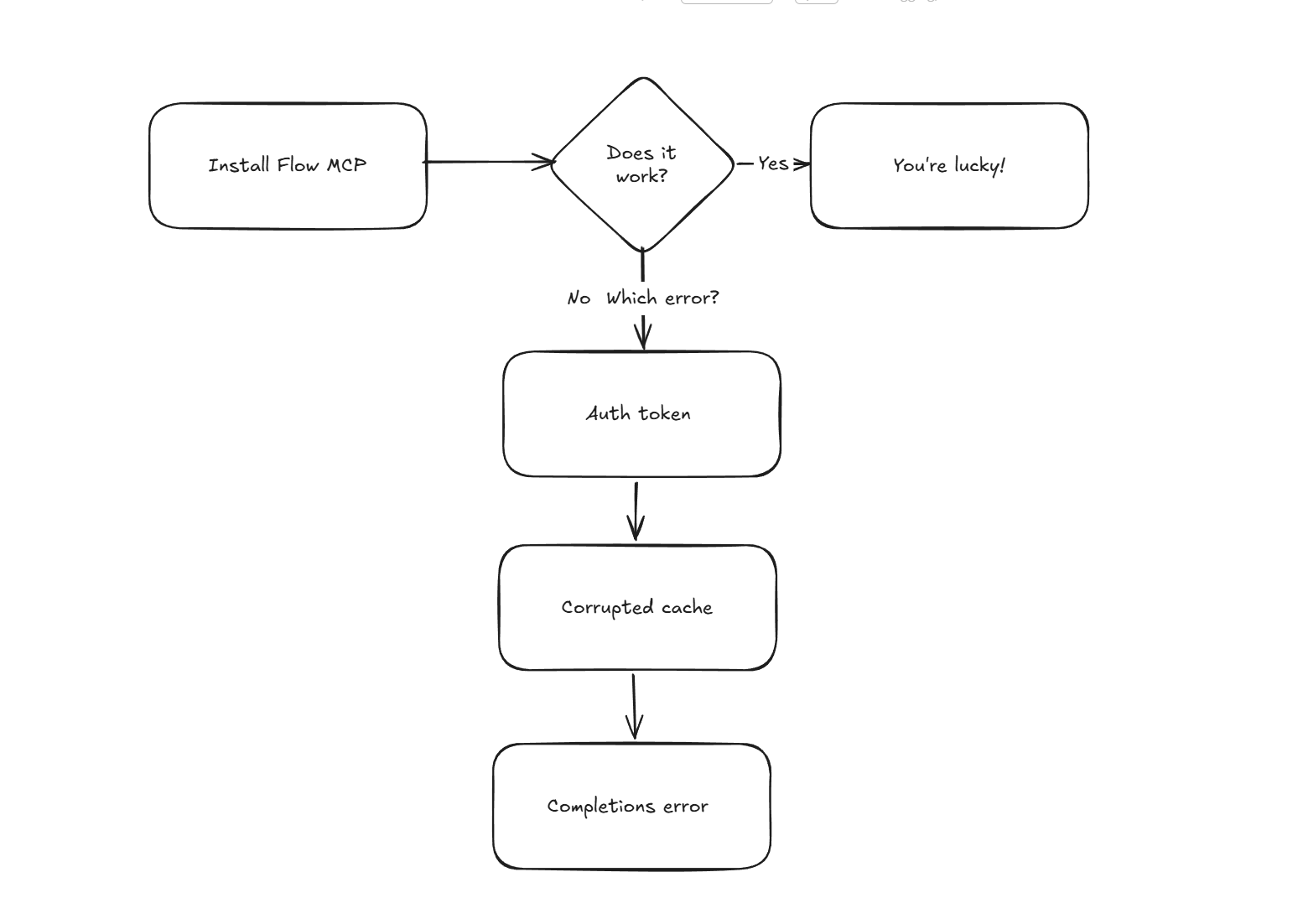
The first problem is the Phantom npm Auth Token.
What you'll see:
npm notice: Access token expired or revoked. Please try logging in again.
Once you get this error, the next thing is that at some point, npm created an authentication token that's now expired, and still, npm tries to use it for every request, even for public packages.
How to fix this on your terminal
# Delete the expired token

npm config delete //registry.npmjs.org/:_authToken

# Try installing again

npm install -g @outblock/flow-mcp
There is going to be an output showing "notice"; it is often just noise. If the install completes, you see "added X packages", it worked despite the scary message.
The second problem you are likely to face is the the Corrupted npx Cache.
What you'll see on your terminal is
Error: Cannot find package 'C:\Users\USER\AppData\Local\npm-cache\_npx\...\node_modules\ieee754\index.js'
What it means is that npx caches packages, and sometimes that cache gets corrupted when downloading. The package will look like it is installed, but it is actually broken.
How to fix this:
# Clear the npx cache

npx clear-npx-cache

# Or manually delete it

Remove-Item -Recurse -Force "$env: LOCALAPPDATA\npm-cache\_npx."

# Try again

npx -y @outblock/flow-mcp
The third problem is that the server does not support completions error.
What you'll see in Cursor's MCP logs:
Unhandled Rejection: Error: Server does not support completions (required for completion/complete)

    at FastMCPSession.setupCompleteHandlers
Why does it happen:
This is the biggest one. @outblock/flow-mcp package uses a library called fastmcp, which has a bug. It tries to register a "completions" capability that the underlying MCP SDK doesn't support. This is NOT your fault; it's a version mismatch inside the package itself.
To fix this, let's go through the global install approach.
- First, install the package globally instead of using npx:
npm install -g @outblock/flow-mcp
- Then downgrade the problematic
fastmcpdependency:
cd C:\Users\YOUR_USERNAME\AppData\Roaming\npm\node_modules\@outblock\flow-mcp

npm install fastmcp@1.16.0
- Finally, patch the broken code:
$file = "C:\Users\YOUR_USERNAME\AppData\Roaming\npm\node_modules\@outblock\flow-mcp\node_modules\fastmcp\dist\FastMCP.js"

(Get-Content \(file -Raw) -replace 'this\.setupCompleteHandlers\(\);', '// this.setupCompleteHandlers(); // patched' | Set-Content \)file
- Update your
mcp.jsonto use the global install:
{

  "mcpServers": {

    "flow-mcp": {

      "command": "flow-mcp"

    }

  }
The cursor will try to load the MCP, but it still shows a Red Dot
What it means is that even after installing, Cursor's MCP status shows red with "Error - Show Output."
How to go about this
Click on "Show Output" in Cursor's Tools & MCP settings to see the actual error log.
The Common causes of this error are :
The completion error above (fix with the patch). The cursor can't find the
flow-mcpcommand (use the full path)Node.js version is too old (upgrade to v18+)
The Step-by-Step Complete Working Setup
- Clear Any Existing Issues
# Remove expired auth tokens

npm config delete //registry.npmjs.org/:_authToken


# Clear corrupted cache

Remove-Item -Recurse -Force "$env: LOCALAPPDATA\npm-cache\_np.x"
- Install Globally
npm install -g @outblock/flow-mcp
Wait for it to complete. You'll see warnings; ignore them unless it explicitly fails.
- Verify the installation
flow-mcp --version
It will print a version number like 0.1.12.
- Fix the fastmcp Bug
# Navigate to the installed package
cd C:\Users\YOUR_USERNAME\AppData\Roaming\npm\node_modules\@outblock\flow-mcp

# Downgrade fastmcp
npm install fastmcp@1.16.0

# Patch the broken line
$file = "C:\Users\YOUR_USERNAME\AppData\Roaming\npm\node_modules\@outblock\flow-mcp\node_modules\fastmcp\dist\FastMCP.js"
(Get-Content \(file -Raw) -replace 'this\.setupCompleteHandlers\(\);', '// this.setupCompleteHandlers(); // patched' | Set-Content \)file
- Testing it manually
cd "C:\path\to\your\project"

flow-mcp
You will see:
The server is running on stdio

{"method": "ping", "jsonrpc": "2.0", "id":0}

{"method": "ping", "jsonrpc": "2.0", "id":1}

...
Just press Ctrl+C to stop it. This confirms it's working.
- Configure Cursor
Open or create C:\Users\YOUR_USERNAME\.cursor\mcp.json:
{

"mcpServers": {

"flow-mcp": {

"command": "flow-mcp"

}

}

}
Restart Cursor properly, and to restart, don't just close the window; use Task Manager to fully kill Cursor, then launch Cursor again.
Verify the Connection by going to Settings, then Tools & MCP in Cursor. You should see:
flow-mcpwith a green dotStatus: Connected
Common errors and how to quickly fix them
- "Command not found: flow-mcp.": It is caused by the Node's global bin directory not being in your PATH. How to fix it:
# Find where it's installed

npm config get prefix

# Add C:\Users\YOUR_USERNAME\AppData\Roaming\npm to your PATH

# Or use the full path in mcp.json:

{

"mcpServers": {

"flow-mcp": {

"command": "C:\Users\YOUR_USERNAME\AppData\Roaming\npm\flow-mcp.cmd"

}

}

}
Cursor Still Showing a Red Dot
Check "Show Output" for the actual error
Verify
flow-mcpruns manually in the terminalTry the
cmdwrapper inmcp.json:
{

"mcpServers": {

"flow-mcp": {

"command": "cmd",

"args": ["/c", "flow-mcp"]

}

}

}
"Unhandled Rejection: UnexpectedStateError" means that the completion error was fixed, but there's still a connection issue. Re-run the patch command; the file might have reverted during an npm update.
Resources
[Flow MCP Official Docs](http:// https://github.com/onflow/flow-mcp)


